Important Message

You can navigate through the blog posts by using Right and Left Arrow Keys after opening any blog post.
Showing posts with label RAM. Show all posts

2013/10/08

// // 17 comments

Solution for better performance of android phone : Clean Master

                                                                        Today we have something that surely will make your phone extremely fast as if it's new one but before we start let me ask you a question- Till today how many times have you been become a laughing stuff in front of your friends, just because of the ridiculous  performance of your phone? 
                                                                            yes it happens because their mobile rocks and your mobile just hangs in the middle of anything you want to do, now there is a way to get rid of this problem just clean some unnecessary files from some specific areas of your phone to make your phone faster, there  are two ways to do it either you do it manually but in lack of knowledge you may delete some necessary files that might be critical for a particular app’s performance, the second is you should install a mobile app that will do all this stuff for you, such a mobile app is Clean Master. 
                                                                 

Read More

2013/09/24

// // 7 comments

How to maintain your laptop's performance

Image courtesy free digital photos

                                                            Today the meaning of work and fun both is you should have laptop with high performance capability, but there are many features which tells us that we have to do something for maintaining the performance of out laptops and computers, if we don’t care about it, then at one point it will stop caring for us, lets have a look some caring tips I have listed below-

  • DVD Player :   In most of the DVD players lens points upward, so in this case the biggest enemy of it is dust, which can deteriorate it’s performance and even can damage it and in some cases lens loading time increases dramatically, it gives reading error many times, to solve this problem you can leave a disk inside it while shutting down your laptop or desktop pc, it will act as a shield and will protect it from dust, but in case if you are not going to use your laptop for several days then at the time when you will start your computer open the door of your dvd player clean the disk and then use it. 

Read More

2013/09/01

// // 1 comment

How to Use Pen drive to increase your paging space or RAM size in Windows7

                             What is paging space ???

                                                               I will tell you non technical language what is paging ,because you may be a technical person or not , when you use your computer every moment you running actually a program or software on your computer ,now what is program or software ??? well it is the set of instructions written inside your computer's hard disk which when runs it performs a task ,now usually RAM is that memory space of your computer that store your program's or software's lines of instructions inside it to be run ,so the amount of lines it can copy depends on the size of the RAM , now consider if you want to do anything and for doing you have to take instructions from somebody else , then it would be better you learn as much of the instructions to do that work at once ,to avoid wasting your time returning to instructor right ???, in the similar way the computer works it loads instructions in it's memory to do the work effectively and larger it's memory the better the speed of the work to increase the size of the RAM temporarily ,we use pen drive , so that it can determine and add it's space as it's main memory .


        Steps:

          Here are the steps to do it in windows-
         1.  Open Your computer and right click then click on the properties.
                  

           2. Click on the Advanced System Settings
                       
           
          3. After opening system properties click advanced tab click on the settings                


      4. In the Performance options dialog click on the advanced select programs and click change       


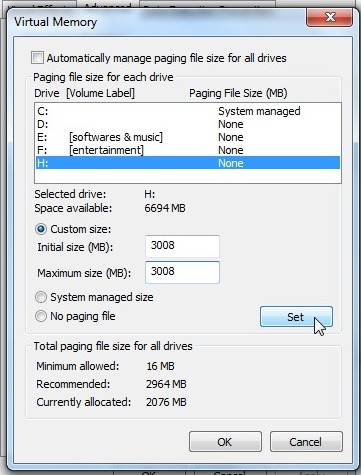
        5. Select your pen drive and uncheck automatically manage paging file over there
                
   
        6. Click custom size and fill initial and maximum size, click set
                

        7. You can see the size you have just allocated from your pendrive to be set.
                     

        8. Press ok button down there and restart your computer, you are done.
                       

Read More